Showing posts with label #KMPLAYERAPP. Show all posts

7.21.2021

[ KMPlayer ] Buy KMPlayer team a coffee.


KMPlayer provide high-quality video players like KMPlayer, 64X, android, ios.


Products by KMPlayer

  • KMPlayer : KMPlayer is a world-renowned multimedia player that can play movies, dramas, music, and other content with an average of 1.5 billion plays a month.
  • KMPlayer 64X : KMPlayer 64X is a player optimized for high-end PCs such as 8K and 60FPS.
  • KMPlayer for Mobile : HD video player that can support smartphones and tablets, and play up to 4k, 8k UHD video quality.
  • KMP for Mobile : KMP is video player which is the light and easy one that can be played in anytime.

Please be a supporter of KMPlayer team.


We are doing our best to develop with heartful mind for KMPlayer might be with your best time.

If you satisfied with our proud product, why don’t you buy us a coffee?

That coffee you buy help us to concentrate on develop and be a encouragement and praise.


Sponsorship will be use for as belows.

    • Operation fee
    • Server & website compensation
    • Translate fee for Global users
    • Device purchase cost for environment test
    • Office maintenance cost
    • PR fee


A cup of coffee’ Value is enough.

   Buy Me A Coffee


Please be a translation volunteer for KMPlayer.

KMPlayer's translation volunteers help KMPlayer cross language and borders.

Translation volunteers create KMPlayer together by translating or reviewing KMPlayer's text.

If you want to be a translation volunteer for KMPlayer, feel free to contact the KMPlayer team.

KMPlayer Team's email : support@kmplayer.com


Please build together for better KMPlayer.

Thank you.

▼ KMPlayer Homepage ▼

https://www.kmplayer.com


▼ KMPlayer Android & iOS application ▼

https://fb.kmplex.com/dlink/share


6.29.2021

[ KMPlayer VIP ] Crop Video & Crop Audio

Added KMPlayer Edit menu!

In the KMPlayer Edit menu, you can quickly and easily use VIP functions such as media cropping, GIF creation, and MP3 extraction.

Also, because GIF files and MP3 files created using each VIP function are gathered, it can be played quickly. 


This useful KMPlayer Edit menu can be moved by clicking “KMP Edit” in [ Home tab > Toolbox ]!


In this post, we will use “Media Crop”, a VIP function added with the KMPlayer Edit menu.

Media Cropping supports a total of two functions.

  1. Crop Video : The ability to crop the desired part of the video.
  2. Crop Audio : The ability to cut the desired part of the audio.


Crop Video

STEP 1) Click [Crop Video] and select the video.

STEP 2) Specify the start and end of the video you want to crop.

STEP 3) Click the confirm button.

Click the Save button on the preview screen and you're done!


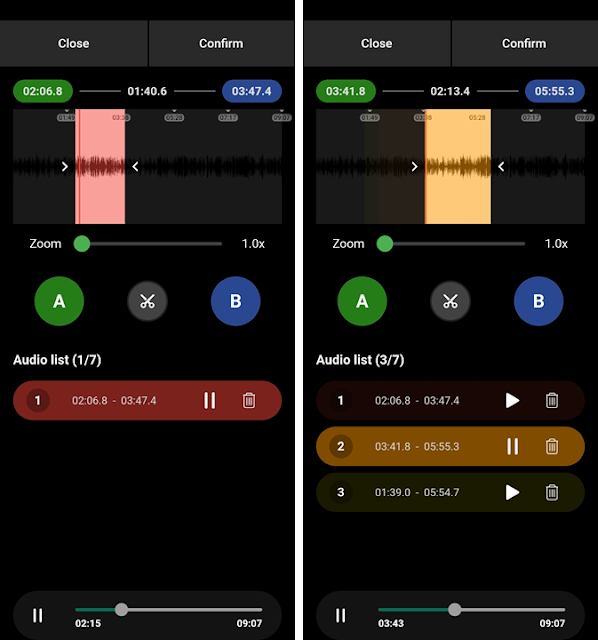
Crop Audio

STEP 1) Click [Crop Audio] and select the audio.

STEP 2) Specify the start and end of the audio you want to cut and click the Scissors button.

Crop Audio function can cut from one audio file to multiple files.

STEP 3) Click the confirm button.

Click the Save button on the preview screen and you're done!


Thank you.


3.12.2021

[ KMPlayer VIP ] Create your own KMPlayer theme – VIP Theme

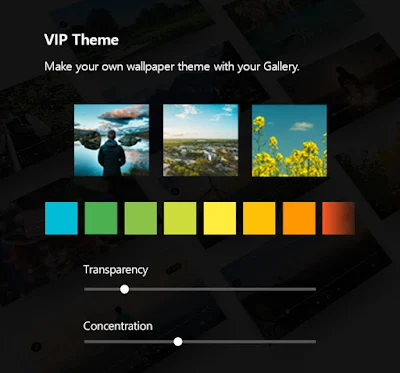
 KMPlayer VIP – Make your own wallpaper theme with your Gallery.

In this post, we will create a "VIP Theme".


STEP 1) Run KMPlayer and click Theme in the toolbox area.


STEP 2) Click VIP THEME on the theme screen.

VIP THEME can be created using a default image or a user image.


STEP 3) Select an image to be used as the KMPlayer theme.

The selected image can be edited.


STEP 4) Choose a background color.


STEP 5) Adjust the background transparency.


STEP 5) Adjust the background blur concentration.


Complete your own KMPlayer theme!


Thank you.


7.11.2019

KMPlayer 64X Multimedia Player? An 8K and HDR Video Player

Share article in KMPlayer 64X :)

KMPlayer 64X is a multimedia player supporting the playback of HDR and 8K video. The 64-bit video player lets you enjoy content in spectacular high definition while providing advanced video effects and more.


If you've ever wanted to enjoy the very best video quality modern technology can offer, then a simple video player just isn't going to cut it. While it might be just fine with standard high-definition content, it's a different matter if you up the resolution to 4K. Take it even higher to the newer 8K formats, and chances are your computer will slow to a crawl, and the video will look more like a slideshow. While you still need a powerful machine to decode 4K and 8K video, having an efficient multimedia player is a must. Not only do these higher resolutions require exponentially more processing power ?they also need very efficient algorithms for decoding and playing back the video so that it's watchable. Add high dynamic range (HDR) into the mix, and the system requirements increase even more. Yet, even if you have a very powerful machine, having the wrong software will let you down.

KMPlayer 64X takes full advantage of today's 64-bit multicore processors to provide users with the best possible playback experience. It uses all of the available hardware in your machine to render video in resolutions of up to 8K, which is a staggering 16 times more on-screen real estate than standard high-definition video formats. If you have a monitor that supports the brilliant dynamic colors of HDR technology, you will never want to go back to standard video recordings again. KMPlayer 64X goes beyond the basic media players included with modern operating systems to provide the richest video viewing experience possible. It's an 8K player and an HDR player that preserves every pixel to let users watch movies and other videos as they were meant to be watched. It also provides various advanced video settings to allow power users to tap into even more features to bring the experience to a whole new level.


Best of all, you don't even need an HDR-enabled monitor to enjoy the rich colors of this new technology. Even if you just have a standard monitor, KMPlayer 64X will express the darkest colors and unleash the best contrasts using its powerful algorithms. Whether it's 4K, 8K, UHD, or 60FPS videos, KMPlayer 64X uses the latest versions of the highest-quality codecs. These include HEVC (h.256), h.264 and VP9, all of which are fully supported by hardware acceleration. This means that CPU usage is kept to a minimum, all without compromising on playback quality. Even if you are using a low-end PC or a low-powered laptop, you will still be able to enjoy very high video quality without draining battery life so much. Thanks to the automatic HDR calibration function, a unique feature built into the video player, it will play the best quality video that your device can support. It also lets you download YouTube videos simply by entering the video's URL and playing it in the program without you having to open your web browser ?a great choice for those who regularly find themselves on the move without internet access.

If you're looking for a lightweight yet cutting-edge 8K player or HDR player, then look no further than KMPlayer 64X at www.kmplayer.com.

▼ KMPlayer Homepage ▼

https://www.kmplayer.com


▼ KMPlayer Android & iOS application ▼

https://fb.kmplex.com/dlink/share

6.12.2019

advertising-free Player, KMPlayer 64X


KMPlayer 64X has no inconvenient ads.
Today I'm going to show you a clean installation process without advertising.

kmplayer


Please log on to the homepage(www.kmplayer.com)
Please download PC 64X.


Let's start the installation now!


There is no check box to install Internet page settings or other programs.


Installation is complete. Let's do it now.

km플레이어 64X

KMPlayer 64X installation is complete.


▼ KMPlayer Homepage ▼

https://www.kmplayer.com


▼ KMPlayer Android & iOS application ▼

https://fb.kmplex.com/dlink/share


3.20.2019

km player APP Free Download Event!


km player APP 5th anniversary event


km player Mobile APP
"Thank you for celebrating my 5th birthday."

km player Pro Mobile APP with no ads FREE!
Download it fast!


▼ KMPlayer Homepage ▼

https://www.kmplayer.com


▼ KMPlayer Android & iOS application ▼

https://fb.kmplex.com/dlink/share

5.09.2016

Play a video by connecting your cloud on KMPlayer!


Hello KMP users! 

Today's posting is about a useful feature of 
KMP application for both iOS and Android! 

KMP app is very useful for playing a video file wherever you are! 

But, some users might face one big problem, 
"The storage of your phone"

If your phone does not have enough storage (such as my phone which is 16GB), adding 2~3GB video file on your phone is hardly thinkable. 

HOWEVER, without adding a video file on your phone, 
you can still enjoy your video file on KMPlayer 
with the feature of "CLOUD CONNECT" 

This Could connect system is available for both iOS and Android, 
the type of available cloud is a bit different though!

Then, let's see how we can use cloud system on KMPlayer!

<iOS>


When you see the main page of your app, 
you see [Cloud] icon on your folder tab. 
Click [Cloud] !  


You see four different options for your cloud! 
KMP Connect, Google Drive, Dropbox, and FTP.  


 KMP Connect is a file sharing program developed by KMPlayer. 
If you already have KMP connect on your PC, 
you can send your video file from your PC to Mobile. 


 Second option is a Google Drive. 
When you click [Google Drive] icon, you can log in with your google ID and your available files are automatically listed. 

Same as Google Drive, you can log in your Dropbox with your Dropbox ID and your available files are automatically listed.  

And finally, input your FTP information and save the info, you'll be connected. 


<Android>

Android cloud connecting system is almost same as iOS! 


Menu tab - [Cloud Service] 


Unlike iOS, Android only supports 
KMP Connect and Google Drive 


Every step is same as I explained above! 
When you log in your Google Drive, 

You see your files which can be played on KMPlayer are listed! 

You need to remember that when you use cloud service on KMPlayer, 
your phone should be connected to data/wifi ! 


-------------------------------------------------------------------
hope you can enjoy your KMP app with all these wonderful features! 

4.20.2016

[KMPlayer App]Useful functions for KMP Android! #1

Hello KMP users ! 

Today, I'd like to explain main functions of KMPlayer Android application to our users for better understanding of the app! 

For Android KMP app, we have many different useful features ! 
And I'd like to explain these features with details! 

Please make sure that this posting is for Android-based KMP application! 
(KMP app for iOS is a bit different!) 

OK, let me start with the overview of the main features! 
Please see below screenshot!


For specific features, please see below ! 
Start with the menu bar on the right top first ! 

When you click the menu bar, you will see three setting options! 


First setting option is subtitle setting.
When you click [subtitle], you can see the setting. 
This option enables to set subtitle on/off, open the subtitle and manage the sync!  


Second option is Phase repeating option. 
When you click [A-B Repeat], 
You will see A and B appear on your screen as I marked above. 
If you want to repeat certain phase of your video, you can use this function.
Click A for setting starting point and click B to set end point of your phase. 
When you are done with setting the repeating point, 
you'll see the phase is immediately repeated over and over. 


Third option is [Mirror mode] 
When you click [Mirror mode], you see the screen is horizontally reversed. 
You click again the [Mirror mode], it comes back to the original screen.
This option is very useful when you learn a choreography from the video :) 


 Next is playing speed setting. 
The original speed is set as 1.0. 
Below 1.0, the speed is slower and above 1.0 it's faster. 


 And when you touch your left side of screen, 
you can optimize your brightness as you see the screenshot.

 Touch your right side of screen, you can control your volume. 


When you click once circulating icon on the left bottom of your screen, 
your video will be played repeatedly after the first play ends. 


When you click again on your icon, your next video on your playlist will be automatically played. 
And click the icon again, it comes back to the original setting. 


Next, you see the screen setting. Please see the very bottom right of the screen. 
There are different options for the screen. 
Above screen is fitting horizontally.  

Below screenshots show you different options. 


But I would recommend to set as [Best fit] for your watching 
which is actually automatically set when you open the file. 


Hope this post will help our users to use KMPlayer App effectively!  :)  
Have a great day ! 


▼ KMPlayer Homepage ▼

https://www.kmplayer.com


▼ KMPlayer Android & iOS application ▼

https://fb.kmplex.com/dlink/share