Showing posts with label #KMPLAYER. Show all posts

8.12.2025

πŸŽ‰KMP Customer Lounge is Now Open – Let’s Build the Best Video Player Together!


KMP Customer Lounge


KMPlayer, the No.1 multimedia player trusted by millions worldwide,
is excited to announce the launch of the KMP Customer Lounge.

This is the place where you can:

  • Suggest new features

  • Share usage tips

  • Solve playback issues together with the community

Whether you enjoy a free video player, a 4K video player, or an ad-free video experience,
your feedback can help shape KMPlayer’s future.
Join us today and be part of our global community!

πŸ‘‰ Go to KMP Customer Lounge

3.13.2025

Try using PIP (Pop-up Player)!

Use the PIP function

Hello, this is the KMPlayer team. πŸ˜Š
Today, I'm going to introduce you to PIP (Picture-in-Picture).
Have you ever wanted to watch a video and do something else at the same time?
PIP is the perfect feature for that. Let's take a look at how to use it and what its advantages are!


πŸ”Ž Use the PIP function!

1. Flexible control function


Move 10 seconds ago, 10 seconds later buttons have been added.
It is quick and easy to use in situations where short sections need to be moved rather than manipulating the play bar, which increases the intuitiveness of operation.


2. Support for iOS pop-up player


Have you been inconvenienced by the lack of a pop-up player function in iOS? πŸ₯Ή
Now, the PIP function is supported in KMPlayer iOS!
πŸ“’ Supported devices: iOS 15.0 or higher (⚠️ If your version is lower, please update iOS first.)


πŸ’‘ Attractive points of PIP function! 

1️⃣ Free adjustment πŸ”„ 
 
You can freely adjust the size of the PIP window to the size you want.


2️⃣ Multitasking optimization πŸ“±  
 
You can continue watching the video while using other apps such as web surfing, chatting, and writing notes.


3️⃣ Intuitive control πŸŽ›  
 
You can use the play/pause, forward/backward 10-second movement functions, and the easy operation allows you to quickly navigate to the scene you want.


4️⃣ Supports both Android & iOS πŸ“²  
 
It can be used not only on Android but also on iOS. 


✅ How to use PIP function! 


 1️⃣ Click the "PIP" icon at the bottom right of the video playback screen.


2️⃣ Allow permission to display on top of other apps.
(Settings - Applications - KMPlayer - Appear on top - Allow permission)


3️⃣ If permission is allowed, switch to pop-up mode
The video will change to a small window floating on the screen,
and will continue to play even if you open other apps.
You can drag the window to move its position or freely adjust its size.


If you haven't tried it yet, update KMPlayer and turn on PIP right now!
If you have any questions or interesting usage methods after using it,
please share them in the comments.
Please look forward to what useful functions I will introduce next time,
and have fun watching today! 🎬🎡
Thank you. 😊


▼ KMPlayer Homepage ▼

https://www.kmplayer.com


▼ KMPlayer Android & iOS application ▼

Download on the App Store

11.14.2023

Introducing KMPlex UI/UX update

Hi users this is KMPlex

In this 33.11.092 update version, our UI / UX are better improved previous version.


Changes to the Home Screen


The information about the grades I have acquired and the points history has been improved for a clear overview on the home screen. The user interface has been enhanced to easily display various important notifications and promotion conditions.


Additionally, through the "Use Points" button, you can utilize the points you have earned, and with the "Money Box," you can check transaction history, detailed grade information, and item acquisition details.


Guidance on Various Point Accumulation Methods

Guidance is provided on various methods to accumulate points, including the "Daily Collection" offered by KMPlex, where you can collect points daily through activities such as roulette, bingo, and media viewing.


Through "Unlimited Earning," you can enjoy a variety of entertainment, including games, shopping, and app installations, to accumulate points as much as you desire via various offers.


Improvements to Point History


Using the "Use" menu, you can easily check your current points and upcoming points to be accrued. Furthermore, you can use the points you possess through various gift card exchanges such as Naver Pay, CU, and MBL or CBK exchanges.


▼ KMPlayer Homepage ▼

https://www.kmplayer.com


▼ KMPlayer Android & iOS application ▼

Download on the App Store

8.29.2023

youtube download video free - best video player


youtube download video for free

Greetings, customers. This is the KMPlayer team.

You can now very easily and very faset download youtube video files and audio files for free when using KMPlayer PC or KMPlayer 64X.

You can download youtube videos as well as convert them to mp3 files. 


<How to use>

1. Go to the YouTube site and copy the URL address of the video you want to download.

2. Launch KMPlayer PC.

3. Click on the "Download" icon located at the bottom left corner.

4. The URL address will be automatically pasted, and a settings menu will appear.

5. Select your video and audio quality settings.

6. Start the download and enjoy watching videos.


πŸ‘‡πŸ‘‡πŸ‘‡ Download Best Free Video Player πŸ‘‡πŸ‘‡πŸ‘‡


Also, users had to use the wired connection and file transfer method provided by each mobile operating system in order to transfer files from their PC to KMPlayer. 

Transfer Video & audio file via Wi-Fi


Please, 

The user can only download videos and recordings that the copyright holder has allowed.

The downloaded file should only be used for personal use, not for profit.

Redistribution is the responsibility of the user of the user and is protected by copyright.


▼ KMPlayer Homepage ▼

https://www.kmplayer.com


▼ KMPlayer Android & iOS application ▼

Download on the App Store


8.17.2023

[KMPlayer] KMPlayer PC update announcement (Youtube Download)

youtube download - free video player

Greetings, customers. This is the KMPlayer team.


We are excited to announce a feature update for KMPlayer PC.


You will find a download icon at the bottom left with this update. You can now easily download YouTube videos and audios for free when using KMPlayer PC.


<How to use>

1. Go to the YouTube site and copy the URL address of the video you want to download.

2. Launch KMPlayer PC.

3. Click on the "Download" icon located at the bottom left corner.

4. The URL address will be automatically pasted, and a settings menu will appear.

5. Select your video and audio quality settings.

6. Start the download and enjoy watching videos 


And, You can transfer the video/audio files from PC to mobile or download files from mobile to PC.

Sharing via Wi-Fi (wireless file transfer)

file transfer via wifi


▼ KMPlayer Homepage ▼

https://www.kmplayer.com


▼ KMPlayer Android & iOS application ▼

Download on the App Store

5.03.2023

New Update: Sharing via Wi-Fi (wireless file transfer) feature - Android, iOS Available


Hello, this is the KMPlayer team.


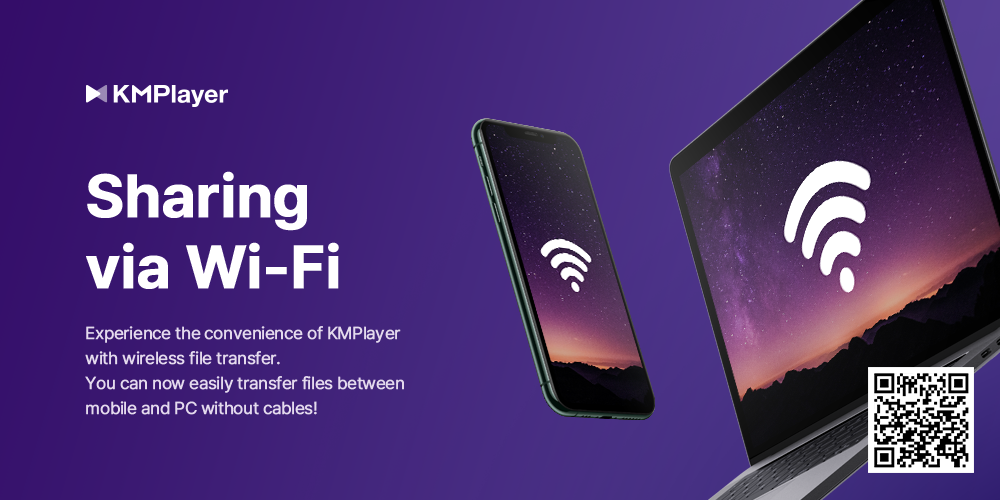
We introduce a new Sharing via Wi-Fi feature in KMPlayer, which is a wireless file transfer feature that makes it much easier to transfer video and music files from a PC to KMPlayer.


Previously, users had to use the wired connection and file transfer method provided by each mobile operating system in order to transfer files from their PC to KMPlayer. Now, with the new Sharing via Wi-Fi feature, users can easily transfer their files by simply entering an address into the internet browser.


The method for using Sharing via Wi-Fi (wireless file transfer) feature is as follows:

1. Connect the same Wi-Fi to your phone and PC

2. Activate the Sharing via Wi-Fi feature in the KMPlayer app

3. Approve folder access permission

4. Confirm the IP address and port number that has been issued

5. Execute the internet browser on your PC and enter the IP address and port number in the address bar

    (※ The wireless file transfer feature is optimized for the Chrome browser. Please use Chrome browser.)

6. Transfer files from PC to mobile or download files from mobile to PC.


※ Please note that to use the Sharing via Wi-Fi feature, both the PC and mobile must be connected to the same wireless network.


πŸ‘‰πŸ‘‰πŸ‘‰ youtube download video free best video πŸ‘ˆπŸ‘ˆπŸ‘ˆ


※ Service may be changed according to the circumstances of the company.


▼ KMPlayer Homepage ▼

https://www.kmplayer.com


▼ KMPlayer Android & iOS application ▼

Download on the App Store

3.14.2023

KMPlayer - Play to Earn improve service

 Following the app-tech service market, we are an updated media play earning service.


Not only can you watch and listen to content using KMPlayer, but you can also earn points. These points can be converted to MBL or CBK, and you can transfer coins to exchange(e.g. Upbit, Binance, etc).


Points are automatically earned when users play videos, music and Youtube. You can earn 4P per sec and with a maximum of 5,000P.


and you can also earn up to 5,000P extra points benefit by using the new feature “Random Points”.

※ The Random Points can be used up to 12 times a day, and you can earn points by watching AD.


Thank you so much.


※ Policy may be subject to change according to the company's circumstances.


▼ KMPlayer Homepage ▼

https://www.kmplayer.com


▼ KMPlayer Android & iOS application ▼

Download on the App Store

[KMPlayer] Over 3.6 million users downloaded the KMPlayer application

Hello, all users this is the KMPlayer team.

In 2023 years over 3.6 million users downloaded the KMPlayer application.


We couldn't have achieved the 3.6 million download numbers without the dedication of our employees who create the service and our customers who have consistently used our service.

Once again, we really appreciate your loyalty.

After launching the KMPlayer service, we are trying to provide better service to customers and will soon release new features and services. Please pay close attention to our service.


Regard.

KMPlayer team


▼ KMPlayer Homepage ▼

https://www.kmplayer.com


▼ KMPlayer Android & iOS application ▼

Download on the App Store

1.26.2022

[ KMPlayer APP ] KMPlayer supports Home Mode!


Tips for using KMPlayer APP #HomeMode


For users' convenient use of KMPlayer, 

we are the KMPlayer team who are thinking about various UIs, themes, and modes!


The function I'm going to introduce today is [Home Mode].

KMPlayer supports a total of two home modes!

PAGE MODE helps you access various functions easily.

TAB MODE helps manage many lists easily.


Let me introduce these two modes.


< How to change Home Mode >

After clicking the 'Home Screen Setting' icon at the top of the home screen, it can be changed in MODE.


< PAGE MODE >

In PAGE MODE, functions and storage are listed as respective icons, 

so you can move to the corresponding function and storage page with a single touch. 


< TAB MODE >

In TAB MODE, it is useful for list management as KMPlayer default mode.

Internal/external storage is divided by folder, and cloud or favorites are listed as a list.


In this posting, we introduced KMPlayer [Home Mode].

Please use [Home Mode] a lot from now on!


Enjoy videos with KMPlayer APP!

Thank you.


▼ KMPlayer Homepage ▼

https://www.kmplayer.com


▼ KMPlayer Android & iOS application ▼

https://fb.kmplex.com/dlink/share


7.21.2021

[ KMPlayer ] Buy KMPlayer team a coffee.


KMPlayer provide high-quality video players like KMPlayer, 64X, android, ios.


Products by KMPlayer

  • KMPlayer : KMPlayer is a world-renowned multimedia player that can play movies, dramas, music, and other content with an average of 1.5 billion plays a month.
  • KMPlayer 64X : KMPlayer 64X is a player optimized for high-end PCs such as 8K and 60FPS.
  • KMPlayer for Mobile : HD video player that can support smartphones and tablets, and play up to 4k, 8k UHD video quality.
  • KMP for Mobile : KMP is video player which is the light and easy one that can be played in anytime.

Please be a supporter of KMPlayer team.


We are doing our best to develop with heartful mind for KMPlayer might be with your best time.

If you satisfied with our proud product, why don’t you buy us a coffee?

That coffee you buy help us to concentrate on develop and be a encouragement and praise.


Sponsorship will be use for as belows.

    • Operation fee
    • Server & website compensation
    • Translate fee for Global users
    • Device purchase cost for environment test
    • Office maintenance cost
    • PR fee


A cup of coffee’ Value is enough.

   Buy Me A Coffee


Please be a translation volunteer for KMPlayer.

KMPlayer's translation volunteers help KMPlayer cross language and borders.

Translation volunteers create KMPlayer together by translating or reviewing KMPlayer's text.

If you want to be a translation volunteer for KMPlayer, feel free to contact the KMPlayer team.

KMPlayer Team's email : support@kmplayer.com


Please build together for better KMPlayer.

Thank you.

▼ KMPlayer Homepage ▼

https://www.kmplayer.com


▼ KMPlayer Android & iOS application ▼

https://fb.kmplex.com/dlink/share


6.30.2021

[ KMPlayer 64X ] Let's play neatly without a control box!


Hello.


Do you like watching game-related content while playing games?

Do you like watching movies while doing other things on your computer?

Do you like taking notes on your computer while listening to video lectures?

If so, here's a tip for KMPlayer 64X!


The tip I'm going to introduce this time is [ Default Control Autohide mode ]!

If you use this mode, the top and bottom control boxes are hidden.


STEP 1 ) Click [ Right mouse button > View > Default Control Autohide mode ].


STEP 2 ) Confirm that [ Default Control Autohide mode ] is applied.

Please use the [ Default Control Autohide mode ] function of KMPlayer 64X a lot.


Thank you.


6.29.2021

[ KMPlayer VIP ] Crop Video & Crop Audio

Added KMPlayer Edit menu!

In the KMPlayer Edit menu, you can quickly and easily use VIP functions such as media cropping, GIF creation, and MP3 extraction.

Also, because GIF files and MP3 files created using each VIP function are gathered, it can be played quickly. 


This useful KMPlayer Edit menu can be moved by clicking “KMP Edit” in [ Home tab > Toolbox ]!


In this post, we will use “Media Crop”, a VIP function added with the KMPlayer Edit menu.

Media Cropping supports a total of two functions.

  1. Crop Video : The ability to crop the desired part of the video.
  2. Crop Audio : The ability to cut the desired part of the audio.


Crop Video

STEP 1) Click [Crop Video] and select the video.

STEP 2) Specify the start and end of the video you want to crop.

STEP 3) Click the confirm button.

Click the Save button on the preview screen and you're done!


Crop Audio

STEP 1) Click [Crop Audio] and select the audio.

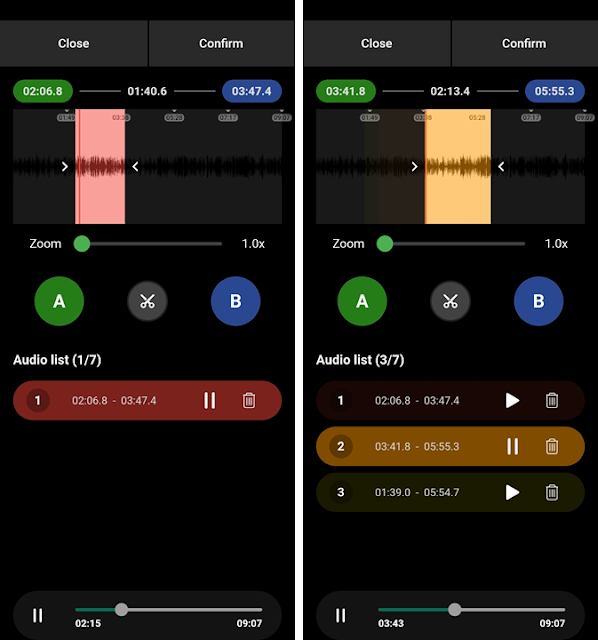
STEP 2) Specify the start and end of the audio you want to cut and click the Scissors button.

Crop Audio function can cut from one audio file to multiple files.

STEP 3) Click the confirm button.

Click the Save button on the preview screen and you're done!


Thank you.


4.05.2021

[ KMPlayer APP ] Create your own KMPlayer with Home screen setting.

Tips for using KMPlayer APP #HomeScreenSetting


I don't want to see features I don't need!

I want to arrange the screens in the order I use them often!


The KMPlayer APP can freely change the composition of the home screen.


In this post, We will change the composition of the home screen.


STEP 1) Click the 'Home Screen Setting' icon at the top of the home screen.

When clicked, it moves to the 'Home Screen Setting' screen.


STEP 2) In the Home Screen Setting, specify the order and ON/OFF for each group.


STEP 3) Setup complete!


Enjoy videos with KMPlayer APP!


Thank you.


▼ KMPlayer Homepage ▼

https://www.kmplayer.com


▼ KMPlayer Android & iOS application ▼

https://fb.kmplex.com/dlink/share


3.26.2021

[ KMPlayer APP ] Create multiple playlists with My List

 Tips for using KMPlayer APP #MyList

There are videos and music that match your situation, such as parties, drives, and reading.

For example, just like there are music that each person listens to on a rainy day!


With KMPlayer APP, you don't have to find the same music and videos every time depending on the situation!

You can make your own playlist “MyList” in advance!


In this post, We will create MyList!


First way to add!


STEP 1) Go to the MyList tab.

How to move MyList : : My Tab > First Tab


STEP 2) Click the + button (Make New Mylist).

Then enter a name for MyList and click ‘OK’. 


STEP 3) Click the More button on the specific media in the media list.

Click on "Add Mylist". Then select the Mylist to which you want to add the media.


Mylist is added!


Second way to add!


STEP 1) Click the More button on the specific media in the media list.

Click on "Add Mylist". 


STEP 2) Click the + button (Make New Mylist).

Then enter a name for MyList and click ‘OK’. 


Mylist is added!


Play on MyList!


STEP 1) Go to the MyList tab.

After selecting MyList to play, first select the video to play.


Thank you.

-----------

▼ KMPlayer Homepage ▼

https://www.kmplayer.com


▼ KMPlayer Android & iOS application ▼

https://fb.kmplex.com/dlink/share


▼ Facebook ▼

https://www.facebook.com/kmpmedia/


▼ Instagram ▼

https://www.instagram.com/kmplayer_official/


3.18.2021

[ KMPlayer APP ] Create an easy-to-use video player with quick button settings.

Hello.


First ) The quick button doesn't have the function I want!

Second ) I want to use all the functions of the video player as a quick button!

Third ) I want to use a neat video player without a quick button!


Have you ever thought about the above while using a video player?

Try using the Quick Button setting in the KMPlayer APP!


KMPlayer APP can use all the menus of the video player as quick buttons.

In this post, we will use the quick button setting.


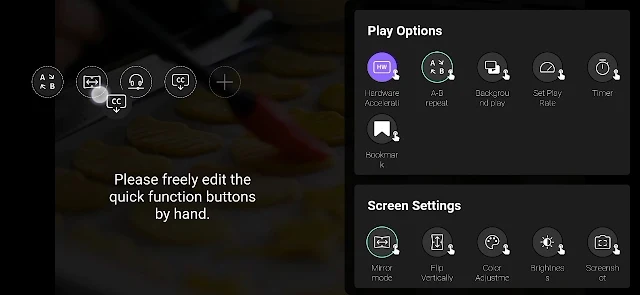
STEP 1) Run the video. Then, click the pencil button next to the quick button on the video player screen. 

STEP 2) On the Quick Button Setup screen, click the menu that you want to set as the Quick Button.

STEP 3) Change the order of the selected quick buttons.

STEP 4) Now try using the quick button! 

Enjoy videos with KMPlayer APP!


Thank you.

----

▼ KMPlayer Homepage ▼

https://www.kmplayer.com


▼ KMPlayer Android & iOS application ▼

https://fb.kmplex.com/dlink/share


▼ Facebook ▼

https://www.facebook.com/kmpmedia/


▼ Instagram ▼

https://www.instagram.com/kmplayer_official/