Showing posts with label kmplayer. Show all posts

11.25.2021

[ KMPlayer APP ] Video Player KMPlayer, Global 1 day download Achieved 1Million!


KMPlayer team came with good news!

The KMPlayer app has achieved 1 million downloads per day globally!

Since the renewal of the KMPlayer app in February 2020, 

we have communicated with users and created KMPlayer together.


Through reviews full of users' interest and love, 

new features have been updated or existing functions have improved more.

And now users from various countries around the world are meeting KMPlayer.


This happy news is all thanks to your interest and love!


Thank you very much!

We will continue to be a KMPlayer full of fun and emotion!


Thank you.


▼ KMPlayer Homepage ▼

https://www.kmplayer.com


▼ KMPlayer Android & iOS application ▼

https://fb.kmplex.com/dlink/share


3.05.2021

[ KMPlayer VIP ] Extracting the video's audio to MP3, MP3 Converter

KMPlayer VIP – The MP3 converter function extracts the audio of the video and turns it into an MP3 file.

In this post, we will use the "MP3 converter function".


STEP 1) Run KMPlayer and click MP3 Maker in the toolbox area.


STEP 2) Click the Extracting MP3 or Floating button in the MP3 Maker folder.

Then select a video.


STEP 3) Select Tracks of audio to be extracted and Quality(128K, 196K, 256K, 320K) of MP3 files.

MP3 extraction complete!


STEP 4) The extracted MP3 files can be shared & played & renamed right away.


STEP 5) Play with extracted MP3 files! 


Thank you.


▼ KMPlayer Homepage ▼

https://www.kmplayer.com


▼ KMPlayer Android & iOS application ▼

https://fb.kmplex.com/dlink/share

2.26.2021

[ KMPlayer VIP ] Create meme(GIF) in Advanced Mode

 KMPlayer VIP - GIF Toast feature has two mode.

1. Easy mode : You can create funny meme by easy mode just click on sector and speed.

2. Advanced mode : You can also create gif from your favorite movie precisely with many diverse option from advanced mode like trimming, section adjustment, FPS and frame select.


In this posting, We will make a meme(GIF) in "Advanced mode". 


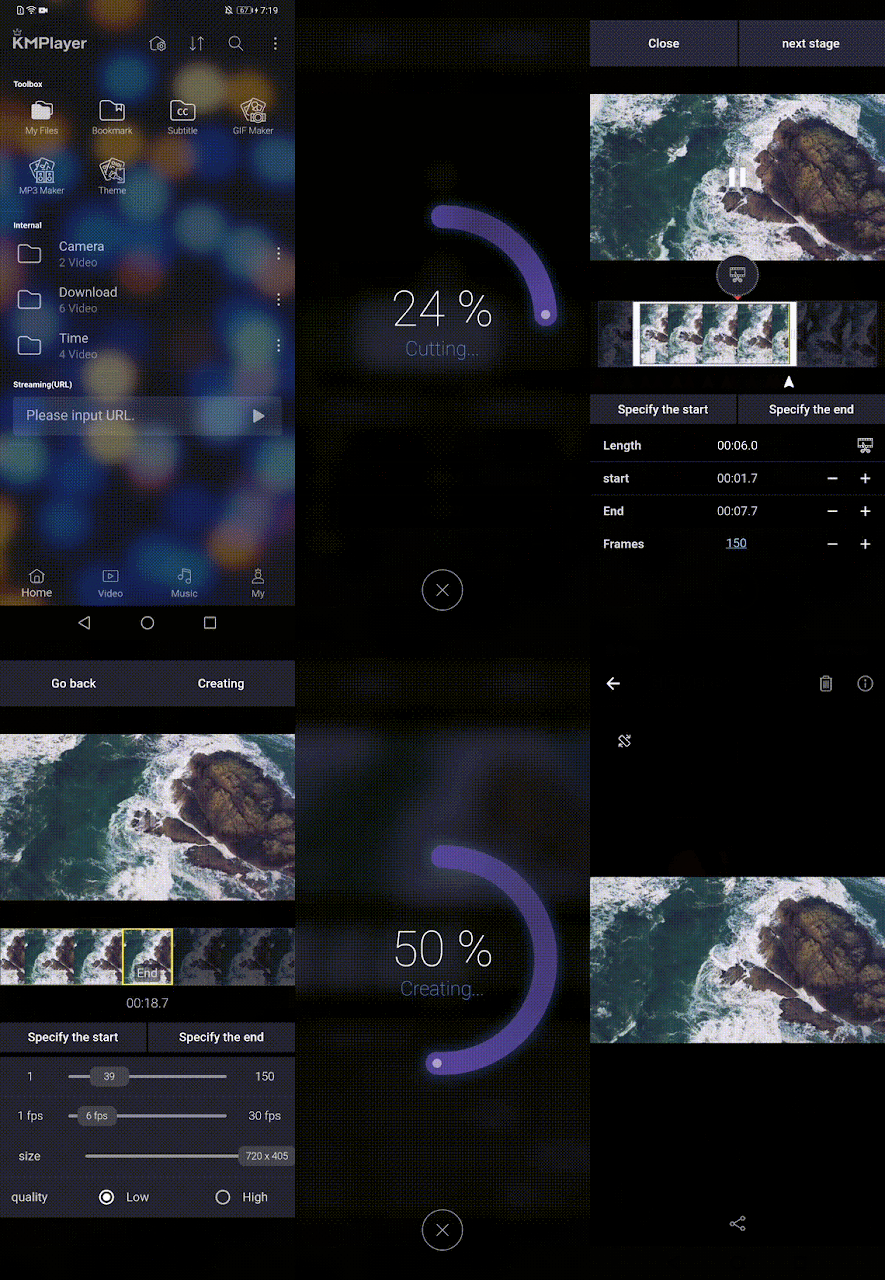
STEP 1) Launch KMPlayer and select a video to make into meme(GIF).


STEP 2) Click the [More > GIF] button and select Advanced Mode from the Mode Selection screen.


STEP 3) Select the section to be made into GIF and click Next Stage.

- Select a section using the crop button


- Section selection using the 'Specify the start' and 'Specify the end' buttons 

- Section selection using the '+' and '-' buttons 

STEP 4) Adjust the GIF options. (Frame start & end, FPS, size, quality)

- Select the start and end of the frame


- Adjust FPS and size.

- Select quality.


STEP 5) Press the Creating button.


STEP 6) Check the created GIF on the preview screen.


To save to my smartphone, click the Save icon!


Make a fun meme with KMPlayer VIP!


Thank you.


▼ KMPlayer Homepage ▼

https://www.kmplayer.com


▼ KMPlayer Android & iOS application ▼

https://fb.kmplex.com/dlink/share

2.19.2021

[ KMPlayer VIP ] Create meme(GIF) in Easy Mode

 KMPlayer VIP - GIF Toast feature has two mode.

1. Easy mode : You can create funny meme by easy mode just click on sector and speed.

2. Advanced mode : You can also create gif from your favorite movie precisely with many diverse option from advanced mode like trimming, section adjustment, FPS and frame select.


In this posting, we will make a meme(GIF) in "Easy mode". 


STEP 1) Run KMPlayer and click GIF Maker in the toolbox area.


STEP 2) In the GIF Maker folder, click the Floating button at the bottom of the screen.
And choose a video to make with GIF.

STEP 3) On the Mode Selection screen, select the Easy mode.


STEP 4) Select the section of the video. (Within 30 seconds)


STEP 5) Select the Speed. (Slowly, Original Speed, Fast)


STEP 6) Press the Creating button.


STEP 7) Check the created GIF on the preview screen.

To save to my smartphone, click the Save icon!


Make a fun meme with KMPlayer VIP!


Thank you.

▼ KMPlayer Homepage ▼

https://www.kmplayer.com


▼ KMPlayer Android & iOS application ▼

https://fb.kmplex.com/dlink/share

KMPlayer VIP - Subscription service(paid) launch.


You can enjoy advanced KMPlayer features by subscript new service of “KMPlayer VIP” that newly launched.

Let me introduce KMPlayer VIP feature.


Feature of KMPlayer VIP


1. GIF Toast

Create dynamic pictured GIF from your favorite video to select as you want.

GIF Toast feature has two mode-one for the “Easy” mode and the other is “Advanced”.

Easy mode : You can create funny meme by easy mode just click on sector and speed.

Advanced mode : You can also create gif from your favorite movie precisely with many diverse option from advanced mode like trimming, section adjustment, FPS and frame select.


2. MP3 Converter

Extract and convert to MP3 audio from your favorite video media file quick and easy.

You can extract audio file to MP3 file by select its track and quality regarding.

And can share it from extract screen for just one click.


3. VIP Theme

Create for your own theme with photo in your smart device.

You can set up your KMPlayer theme with picture selection, manage its brightness, transparency and sharpness.

Make your own KMPlayer theme with combination.


We also will add special feature for KMPlayer VIP only.


You can subscript KMPlayer VIP by in app purchase from KMPlayer for 1 month, 6 month and 12 month. WE specially offer you 3-days free trial for only once per account.

We provide KMPlayer VIP on Google Play Store now and iOS version open soon.


Thank you.

▼ KMPlayer Homepage ▼

https://www.kmplayer.com


▼ KMPlayer Android & iOS application ▼

https://fb.kmplex.com/dlink/share

6.12.2019

advertising-free Player, KMPlayer 64X


KMPlayer 64X has no inconvenient ads.
Today I'm going to show you a clean installation process without advertising.

kmplayer


Please log on to the homepage(www.kmplayer.com)
Please download PC 64X.


Let's start the installation now!


There is no check box to install Internet page settings or other programs.


Installation is complete. Let's do it now.

km플레이어 64X

KMPlayer 64X installation is complete.


▼ KMPlayer Homepage ▼

https://www.kmplayer.com


▼ KMPlayer Android & iOS application ▼

https://fb.kmplex.com/dlink/share


5.10.2019

KMPlayer 64X New Update! Ver.2019.05.8.05


Hello!

What will Kimi tell you today?

Today's story is  kmplayer 64X Update!

Let's start the new KMPlayer 64X story!


1. New UI/UX


It's a completely new design!


The icon is also perfect.


2. Quick button for users


( Decode Change ) 
Click to change software decoding and hardware decoding easily!

( Subtitled Track )
Click to change the subtitle track easily!

( Audio track )
Click to change the audio track easily!


3. Enhanced Capture Function

Just click on the icon to save the capture image!

How do I check my saved image?
Mouse right button > Option > Capture!


4. Update List

UI/UX Improvement

Support High-resolution monitor UI/UX(4K, UHD, etc.)
Added UI image enlarging function according to DPI information
Added 3D Quick Menu
Added Capture Quick Menu
Added HW / SW decoding quick menu
Added audio track quick menu
Added subtitle track quick menu
Added control bar tooltip
Added video capture option
Improved Playlist Border Line
Fixed the problem that Music player button malfunction
Fixed the problem that the update date check box can not be saved.
URL download engine update


▼ KMPlayer Homepage ▼

https://www.kmplayer.com


▼ KMPlayer Android & iOS application ▼

https://fb.kmplex.com/dlink/share


6.23.2016

KMPlayer is updated with VR 360° function! [4.1.0.3]

Hello KMPlayer user! 

KMPlayer is updated with new features! 

4.1.0.3 Update Feature : 
- Added "VR 360º Video Play" function
- Fixed Language (Sinhalese)
- Changed "Use Alternative Texture in VMR9/Direct3D 8 " as default value


 WHHHAAAATTTT ? VR 360º Video Play ?!?!? 

Yes! That  VR 360º video you know! and..
 Yes! KMPlayer now supports that video! 

Okay, basic question! 
What's VR is ?
VR is an acronym of Virtual Reality.

And VR 360 degree video?  
a video shows all angles (360 degree - front/back/right/left side! ), 
not limited to a front side!  

Then, let's see what a new VR function on KMPlayer is ! 

Oh! please note that KMPlayer VR360 feature works normally only your 360 VR video file which means video is taken by a 360 VR supported device is opened.


Once you open the updated KMPlayer, 
you see there's a [VR] icon is newly added on the original KMplayer skin.  


Open your video file and click on the [VR] icon, 


 Your mode is changed as Normal mode 

Or you can change this mode from settings option as well.


Right Click - VR 360 Video Play - View Mode - 01. Normal 

This is the basic & optimized mode for 360 VR video 

Once you set your mode as Normal, 
by dragging your mouse on the screen, you can move the view point. 
Check out below video: 


Not only Normal mode, but KMPlayer also supports Little Planet mode.
When you click on the [VR] icon again, 
it is changed to second mode : Little Planet. 

 This mode shows the video like an alive planet. 


 This mode can be set from settings option as well. 
Right Click - VR 360 Video Play - View Mode - 02. Little Planet 

As I mentioned above, if you want to see the video from every angle, 
you need to drag the mouse by yourself. 

However, you can also turn on the "auto" mode. 


Right Click - VR 360 Video Play - Auto Romtation - Auto (On/Off)


 Your Auto rotation mode is on ! 

 You can also select the direction and the speed of the rotation by yourself 

Right Click - VR 360 Video Play - Auto Rotation - Direction / speed setting 

Once your auto rotation setting is done, you can see your file is playing as below video : 


 You can also make Reverse mode by clicking on
Right Click - VR 360 Video Play - Reverse Mode 
  
 Your Reverse Mode is on. 
From the Normal mode, it is upside down. 

 Once you change the mode as Little Planet from the reverse mode, 
you see the earth and the sky are opposite. 

When you turn off the reverse mode, 
your file comes back as original planet mode.  


 Last setting from VR mode is "Keep current settings". 
Right Click - VR 360 Video Play - Keep Current Settings.

When you turn on "Keep current settings", the same settings are applied to other 360 vr files (However, if you close KMPlayer and reopen the file, your settings will be reset)


Like this! 
I open a different video file and Little Planet Mode remains. 


360 VR function is amazing! 
With this function, virtual reality is now available on KMPlayer :) 

▼ KMPlayer Homepage ▼

https://www.kmplayer.com


▼ KMPlayer Android & iOS application ▼

https://fb.kmplex.com/dlink/share