Showing posts with label player. Show all posts

3.05.2021

[ KMPlayer VIP ] Extracting the video's audio to MP3, MP3 Converter

KMPlayer VIP – The MP3 converter function extracts the audio of the video and turns it into an MP3 file.

In this post, we will use the "MP3 converter function".


STEP 1) Run KMPlayer and click MP3 Maker in the toolbox area.


STEP 2) Click the Extracting MP3 or Floating button in the MP3 Maker folder.

Then select a video.


STEP 3) Select Tracks of audio to be extracted and Quality(128K, 196K, 256K, 320K) of MP3 files.

MP3 extraction complete!


STEP 4) The extracted MP3 files can be shared & played & renamed right away.


STEP 5) Play with extracted MP3 files! 


Thank you.


▼ KMPlayer Homepage ▼

https://www.kmplayer.com


▼ KMPlayer Android & iOS application ▼

https://fb.kmplex.com/dlink/share

2.26.2021

[ KMPlayer VIP ] Create meme(GIF) in Advanced Mode

 KMPlayer VIP - GIF Toast feature has two mode.

1. Easy mode : You can create funny meme by easy mode just click on sector and speed.

2. Advanced mode : You can also create gif from your favorite movie precisely with many diverse option from advanced mode like trimming, section adjustment, FPS and frame select.


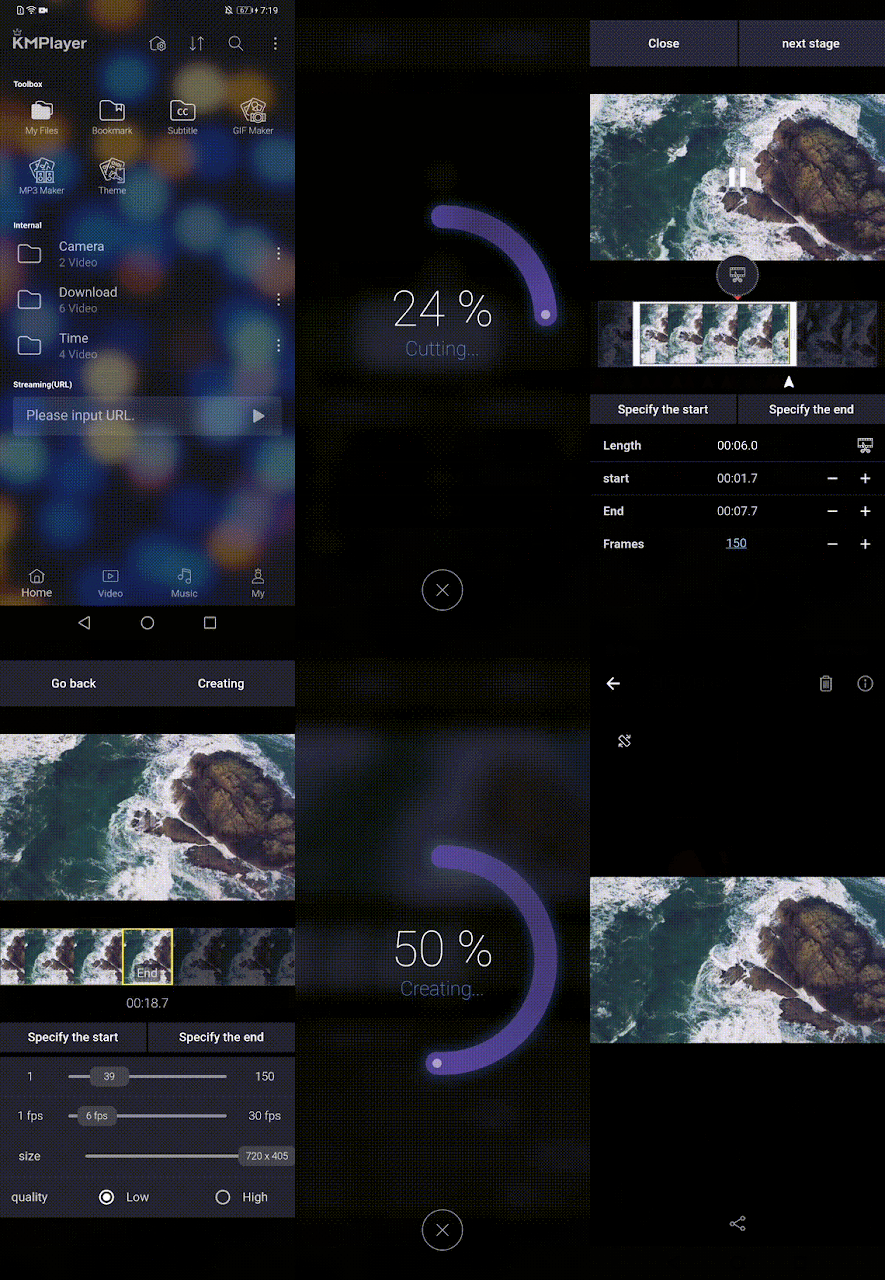
In this posting, We will make a meme(GIF) in "Advanced mode". 


STEP 1) Launch KMPlayer and select a video to make into meme(GIF).


STEP 2) Click the [More > GIF] button and select Advanced Mode from the Mode Selection screen.


STEP 3) Select the section to be made into GIF and click Next Stage.

- Select a section using the crop button


- Section selection using the 'Specify the start' and 'Specify the end' buttons 

- Section selection using the '+' and '-' buttons 

STEP 4) Adjust the GIF options. (Frame start & end, FPS, size, quality)

- Select the start and end of the frame


- Adjust FPS and size.

- Select quality.


STEP 5) Press the Creating button.


STEP 6) Check the created GIF on the preview screen.


To save to my smartphone, click the Save icon!


Make a fun meme with KMPlayer VIP!


Thank you.


▼ KMPlayer Homepage ▼

https://www.kmplayer.com


▼ KMPlayer Android & iOS application ▼

https://fb.kmplex.com/dlink/share

2.19.2021

[ KMPlayer VIP ] Create meme(GIF) in Easy Mode

 KMPlayer VIP - GIF Toast feature has two mode.

1. Easy mode : You can create funny meme by easy mode just click on sector and speed.

2. Advanced mode : You can also create gif from your favorite movie precisely with many diverse option from advanced mode like trimming, section adjustment, FPS and frame select.


In this posting, we will make a meme(GIF) in "Easy mode". 


STEP 1) Run KMPlayer and click GIF Maker in the toolbox area.


STEP 2) In the GIF Maker folder, click the Floating button at the bottom of the screen.
And choose a video to make with GIF.

STEP 3) On the Mode Selection screen, select the Easy mode.


STEP 4) Select the section of the video. (Within 30 seconds)


STEP 5) Select the Speed. (Slowly, Original Speed, Fast)


STEP 6) Press the Creating button.


STEP 7) Check the created GIF on the preview screen.

To save to my smartphone, click the Save icon!


Make a fun meme with KMPlayer VIP!


Thank you.

▼ KMPlayer Homepage ▼

https://www.kmplayer.com


▼ KMPlayer Android & iOS application ▼

https://fb.kmplex.com/dlink/share

KMPlayer VIP - Subscription service(paid) launch.


You can enjoy advanced KMPlayer features by subscript new service of “KMPlayer VIP” that newly launched.

Let me introduce KMPlayer VIP feature.


Feature of KMPlayer VIP


1. GIF Toast

Create dynamic pictured GIF from your favorite video to select as you want.

GIF Toast feature has two mode-one for the “Easy” mode and the other is “Advanced”.

Easy mode : You can create funny meme by easy mode just click on sector and speed.

Advanced mode : You can also create gif from your favorite movie precisely with many diverse option from advanced mode like trimming, section adjustment, FPS and frame select.


2. MP3 Converter

Extract and convert to MP3 audio from your favorite video media file quick and easy.

You can extract audio file to MP3 file by select its track and quality regarding.

And can share it from extract screen for just one click.


3. VIP Theme

Create for your own theme with photo in your smart device.

You can set up your KMPlayer theme with picture selection, manage its brightness, transparency and sharpness.

Make your own KMPlayer theme with combination.


We also will add special feature for KMPlayer VIP only.


You can subscript KMPlayer VIP by in app purchase from KMPlayer for 1 month, 6 month and 12 month. WE specially offer you 3-days free trial for only once per account.

We provide KMPlayer VIP on Google Play Store now and iOS version open soon.


Thank you.

▼ KMPlayer Homepage ▼

https://www.kmplayer.com


▼ KMPlayer Android & iOS application ▼

https://fb.kmplex.com/dlink/share

5.10.2019

KMPlayer 64X New Update! Ver.2019.05.8.05


Hello!

What will Kimi tell you today?

Today's story is  kmplayer 64X Update!

Let's start the new KMPlayer 64X story!


1. New UI/UX


It's a completely new design!


The icon is also perfect.


2. Quick button for users


( Decode Change ) 
Click to change software decoding and hardware decoding easily!

( Subtitled Track )
Click to change the subtitle track easily!

( Audio track )
Click to change the audio track easily!


3. Enhanced Capture Function

Just click on the icon to save the capture image!

How do I check my saved image?
Mouse right button > Option > Capture!


4. Update List

UI/UX Improvement

Support High-resolution monitor UI/UX(4K, UHD, etc.)
Added UI image enlarging function according to DPI information
Added 3D Quick Menu
Added Capture Quick Menu
Added HW / SW decoding quick menu
Added audio track quick menu
Added subtitle track quick menu
Added control bar tooltip
Added video capture option
Improved Playlist Border Line
Fixed the problem that Music player button malfunction
Fixed the problem that the update date check box can not be saved.
URL download engine update


▼ KMPlayer Homepage ▼

https://www.kmplayer.com


▼ KMPlayer Android & iOS application ▼

https://fb.kmplex.com/dlink/share