Showing posts with label #update #KMPLAYER. Show all posts

5.02.2025

🌴 KMPlayer Theme Gallery #4 - Summer


Theme - Use Photo Skin

Hello, this is the KMPlayer team. πŸ˜Š
In the last theme gallery #3, we introduced a landscape theme full of emotions.
In this theme gallery #4, we introduce a summer background theme for the coming summer! ☀️🌊
Capture a cool summer in KMPlayer!


🌞 Summer Theme ✨

The summer theme features bright and vivid colors, and a refreshing and lively atmosphere.
It expresses a cool and free seasonal feeling like a sea sparkling under the sun or a green forest.
If the background is refreshing like summer when you listen to music, it will be a more enjoyable listening experience! 🎢


πŸ–️ Let's take a look at the summer theme!

✔️ Cool color scheme 🎨
- Blue, mint, lime, and other refreshing colors
- Brightly toned backgrounds and refreshingly decorate the player.

✔️ Create a lively atmosphere πŸ’‘
- A free and active feeling unique to summer
- Refreshing regardless of the music genre you listen to.

✔️ Goes well with light mode πŸŒ“
- Colors that naturally match the feeling of shining under the sunlight
- This is the best theme style to use during the day.

✔️ 🎧 Recommended music style
- Perfect for energetic music such as pop, dance, EDM, and city pop!
- Visuals that go well with driving music or travel vlogs


 ✅ Apply Photo Skin!


πŸ“₯ Download Image πŸ‘‡πŸ»


πŸ–️ background 2


Apply photo skin right now and complete your own emotional player!
If there is a style you want to add, please leave a comment. πŸ’¬
Next time, I will introduce a different style of theme! 😊
Thank you.


▼ KMPlayer Homepage ▼

https://www.kmplayer.com


▼ KMPlayer Android & iOS application ▼

Download on the App Store

3.25.2025

πŸŒ„ KMPlayer Theme Gallery #3 - Landscape


Theme - Use Photo Skin

Hello, this is the KMPlayer team. πŸ˜Š
Last time, in Theme Gallery #2, we introduced a sensual gradient background!
Today, we have prepared a "Landscape Background Theme" filled with emotion. 🏞️ πŸŒ…
This time, it's a dreamy landscape image with a combination of pink and purple! πŸ’œπŸ©·
This is a theme that can create a warm yet mysterious atmosphere, so decorate your own emotional player!


πŸŒ„ Landscape Style Theme ✨

You can apply a beautiful landscape as a background to create a comfortable and emotional atmosphere, and you can feel a deeper sense of immersion when combined with music. 🎡
In particular, since landscape photos can create various atmospheres, you can decorate KMPlayer with your own individuality! πŸŒ…πŸŒ²

✔️ Perfect harmony with dark mode – Dark purple tone perfect for dark mode

✔️ Calm and serene mood – Mystery and emotional feeling with soft pink and purple colors

✔️ Various styles can be created – Apply various scenery backgrounds such as sunset, night sky, etc


 ✅ Apply Photo Skin!


πŸ“₯ Download Image πŸ‘‡πŸ»


Apply photo skin right now and complete your own emotional player!
If there is a style you want to add, please leave a comment. πŸ’¬
Next time, I will introduce a different style of theme! 😊
Thank you.


▼ KMPlayer Homepage ▼

https://www.kmplayer.com


▼ KMPlayer Android & iOS application ▼

Download on the App Store

3.17.2025

🎨 KMPlayer Theme Gallery #2 - Gradient


Theme - Use Photo Skin

Hello, this is the KMPlayer team. πŸ˜Š
Last time, I introduced a spring theme style in the KMPlayer theme gallery, right? 🌸
This time, I'll share a new style theme!
Decorate KMPlayer with more personality using Photo Skin!


✨ Gradient style theme ✨

Gradient background is a design where two or more colors are naturally mixed to create a soft color change. 
If you apply it to a KMPlayer theme, you can create a more sophisticated and emotional atmosphere than a simple background! 🎢

✔️ Soft color combination – Optimized for creating an emotional atmosphere

✔️ Simple but sensuous design – Simple but not boring background

✔️ Various atmospheres can be created depending on the color – warm emotion, calm mood, etc.


 ✅ Apply Photo Skin!


πŸ“₯ Download Image πŸ‘‡πŸ»


πŸ“₯ Download Image πŸ‘‡πŸ»


Try out the new theme function yourself and decorate it freely with the style you want!
If there is a style you want to add, please leave a comment. πŸ’¬
Next time, I will introduce a different style of theme! 😊
Thank you.


▼ KMPlayer Homepage ▼

https://www.kmplayer.com


▼ KMPlayer Android & iOS application ▼

Download on the App Store

3.13.2025

Theme - Use Photo Skin!

Theme - Use Photo Skin

Hello, this is the KMPlayer team. πŸ˜Š
Today, I will introduce one of the new theme features of KMPlayer, Photo Skin.
In this post, I will introduce an example of applying Photo Skin and provide a download link for a free background image that you can use right away! πŸ”—
Decorate KMPlayer with more personality using Photo Skin!


πŸ”Ž Let's take a look at the photo skin!

You can set the photo you want as the background.
Create your own unique theme by setting your favorite photo as the background πŸ–Ό️

✔️ You can select the image you want from the gallery – Apply the image you want, such as a photo you took yourself, a background image, etc.

✔️ You can create various styles such as minimal, emotional, and neon – Change freely to fit the desired atmosphere

✔️ Background image editing function – Select only the desired part and apply it neatly

✔️ You can express your own individuality – Make KMPlayer more unique and stylish!


 ✅ Apply Photo Skin!

You can enjoy the warm weather and spring atmosphere by setting a spring-themed image as the background.


πŸ“₯ Download Spring Background


🌼 Spring 2

🌺 Spring 3


Try out the new theme function yourself and decorate it freely with the style you want!
If there is a style you want to add, please leave a comment. πŸ’¬
Next time, I will introduce a different style of theme! 😊
Thank you.


▼ KMPlayer Homepage ▼

https://www.kmplayer.com


▼ KMPlayer Android & iOS application ▼

Download on the App Store

3.12.2025

How to use 2x speed playback!

How to use 2x speed playback

Hello, this is the KMPlayer team. πŸ˜Š
Today, we will introduce the newly added long press to play at 2x speed.
Watch videos more conveniently with the 2x speed playback feature! 🎬🍿


πŸ”Ž Learn about 2x speed playback!

1. Faster and more intuitive speed control


Previously, to change the speed, you had to activate [Set Play Rate] in the More menu - Play options and adjust it manually.
But now, you can play at 2x speed right away by long pressing on both sides of the screen!
When you release your hand, it will return to the original speed, so you can adjust the speed right away without changing unnecessary settings.


2. Adopted "double-end" touch method to prevent accidental pressing


We thought that if you long press anywhere to adjust the speed, you would often accidentally press it.
So we made it work only on both sides of the screen to prevent accidental pressing!


3. Custom function - Selectable according to your needs

This function may be inconvenient, right?
So I made it freely turn it on and off in the settings!
This feature is turned off by default, so that all users can conveniently choose it.
Use it only when you need it, and you can turn it off at any time if you don't want it.


 How to use 2x speed playback 


 1️⃣ Click the More button on the top right - Settings (⚙️) icon


2️⃣ Go to Settings - Gesture menu


3️⃣ Activate the "Long-press to play at 2x speed" option


4️⃣ On the playback screen, long press on either end to play the video at 2x speed. πŸš€
When you release your hand, it will return to the original speed! πŸ‘†⏩


We aim to improve content so that you can consume it more conveniently and smartly.
This long press for 2x speed playback is also part of it, and it has been added to help users watch videos more efficiently. πŸš€
πŸ‘‰ Update KMPlayer right now and experience the new features! 🎬
We will come back with more convenient and great features.
Thank you. 😊


▼ KMPlayer Homepage ▼

https://www.kmplayer.com


▼ KMPlayer Android & iOS application ▼

Download on the App Store

KMPlayer Theme Updated!

Theme Update

Hello, this is the KMPlayer team
To help you use KMPlayer more personally, we've updated the theme features by switching to the existing VIP theme for free. 🎊
Decorate KMPlayer in your own style with color and photo skins! πŸͺ„


πŸ†• Learn about the newly updated themesπŸ”Ž

1. πŸŒ™☀️ Set brightness mode


✔️ Dark mode – easy-to-see screen in dark environments

✔️ Light mode – Bright and clear screen for pleasant use

✔️ System Mode – Follow the instrument's default settings


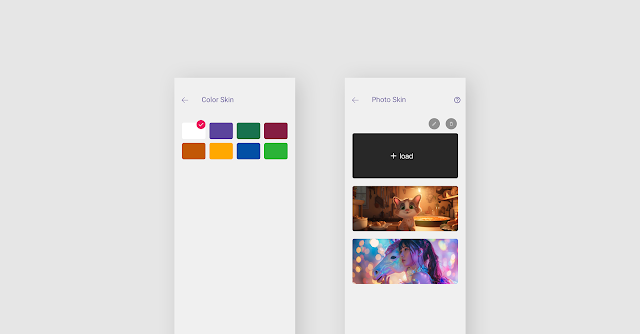
2. 🎨 Color Skin


✔️ You can change the atmosphere of the KMPlayer to the style you want by applying various color themes.

✔️ Available in 8 colors.


3. πŸ–Ό️ Photo Skin


✔️ You can create personalized themes using your own photos!

✔️ After selecting the image in the photo album, you can edit it yourself to complete your own unique skin.

✔️ For first-time users, we also provide 2 sample images, so feel free to start.

⚠️ PhotoSkin is not supported on Android 11 and earlier. (Only sample images provided)


 πŸ“£ How to change the theme 


 1️⃣ Access the theme menu in the
KMPlayer Home - Toolbox - Theme menu or KMPlayer settings


2️⃣ Select brightness mode (dark, light, system)


3️⃣ Select Color Skin or Photo Skin


4️⃣ Color Skin (8 colors available) → Color change


5️⃣ Photo Skin → Select the photo you want, edit it,
and press the Save button to complete your own KMPlayer!


πŸ“’ Update your app and experience new themed features!
We will continue to come back with more convenient and cool features. 😊
Thank you very much. 😊


▼ KMPlayer Homepage ▼

https://www.kmplayer.com


▼ KMPlayer Android & iOS application ▼

Download on the App Store

2.06.2025

2x speed playback feature has been updated!


2x playback updated

Hello, this is the KMPlayer team.
We've added a highly requested feature just for you! πŸŽ‰

Now, just like on YouTube, press and hold the screen to instantly switch to 2x playback speed.
This makes it super easy to fast-forward through long videos or quickly find key moments!

Enjoy a faster and more convenient video-watching experience! ⚡


✅ How to Use It?

πŸ“Œ It’s incredibly simple!
✔️ Settings - Gestures - Turn on the option to long press to play at 2x speed.
1️⃣ While playing a video, press and hold the screen to instantly switch to 2x speed 
2️⃣ Keep holding to maintain 2x speed!  
3️⃣ Release to return to normal playback

🎯 Who Will Love This Feature?
✔️ Viewers who want to quickly find key moments in a video
✔️ Anyone looking to watch long videos in less time
✔️ Fans of YouTube’s 2x speed playback feature


πŸ“’ Update now and try out this amazing new feature!

※ You can turn the [Long press to play at 2x speed] option

on or off in Settings - Gestures.

Give it a go and let us know your thoughts!
Your valuable feedback helps us improve KMPlayer for you.
Thank you! πŸ˜ŠπŸ™Œ


▼ KMPlayer Homepage ▼

https://www.kmplayer.com


▼ KMPlayer Android & iOS application ▼

Download on the App Store


1.06.2025

KMPlayer Lock Widget Update!


Lock widget updated

Hello, this is the KMPlayer team.

The KMPlayer lock widget has been updated!
From now on, control your videos and music more conveniently on your lock screen!

Easy control with the newly added random playback and playback mode buttons.
This update is designed to enable intuitive multimedia control as well as fast access,
making it more convenient to use in everyday life.


πŸ†• What's new about it?


1. Add random playback and playback mode πŸŽ΅


You can explore and play music right away with enhanced control on the lock screen.
Did you want to repeat a certain song while listening to music or enjoy a new song randomly?
Random playback and repeat playback features are now available even on the lock screen. 
Simply set the play mode you want in the widget!


2. Self-image exposure if thumbnail(album cover) is not available 🎨


Fixed an issue where the widget looks empty if the content you are playing does not have thumbnails (cover images).
Now we expose our own images for content that doesn't have a cover image, providing a consistent aesthetic experience.


⚠️ Certain features may not be displayed in some environments, such as One UI 6.
: Please note that some functions may be displayed or supported differently depending on the device or OS version you use.


▼ KMPlayer Homepage ▼

https://www.kmplayer.com


▼ KMPlayer Android & iOS application ▼

Download on the App Store

4.15.2024

KMPlayer UX Improvement Update

KMPlayer Update


Hello, this is the KMPlayer team.

You can find more convenient UX in the updated version of 34.04.181

I'll let you know the key updates! πŸ˜†


1. Add directly to My List from the playback item.


Now you can add desired items to My List right during playback.

If you see a file you want to add to My List while watching media, you can easily add it by pressing the ➕ icon at the top.


2. Randomly change My list order


You can freely change the order of media items in My list.

You can drag and drop the desired irtems to move them into a specific order.


3. My list entire selection function


You can now select all items at once in My List.

If you press and hold a file to enter full selection mode, you can delete and play the files in batches.


4. Add media in Mylist to another Mylist


You can easily add videos and music from My List to other My Lists.


5. Show bookmark thumbnails


Thumbnail images are now displayed for bookmarked videos & music.

You can visually check each bookmarked location and quickly find the file you want.


6. Hide folders at once on the home screen


You can hide multiple folders at once from the selection screen.

Hiding folders has been improved to be handled more efficiently.


KMPlayer is continuously evolving by reflecting user feedback, and will continue to add more features to provide users with the best media playback experience.

Other errors have also been fixed, so enjoy the more convenient KMPlayer right away!😊


▼ KMPlayer Homepage ▼

https://www.kmplayer.com


▼ KMPlayer Android & iOS application ▼

Download on the App Store